Know the statements tie out before you import.
Upload a client’s statement PDFs. Every balance checked to the cent, missing pages and gaps flagged, then a QuickBooks or Xero file. 50 pages free, no card.
Check a statement set freeOperating account ****4417
Example
| Month | Closing | Status |
|---|---|---|
| January | 18,402.77 | Verified |
| February | 12,840.10 | Verified |
| March | 15,119.63 | Needs review |
| April | 9,277.48 | Verified |
March, page completeness: missing page 2 of 3. Download the full statement from the bank again.
Checked to the cent. Three months tie out. March is caught, with the reason.
How a statement set gets checked
The mistakes it catches before they reach the books
The same checks run on every set, with nothing to set up.
Inside each statement
A balance that doesn’t add up
Opening balance plus credits minus debits must equal the closing balance, to the cent.
A running balance that drifts
Every balance printed on a row has to match the rows above it.
A missing page
“Page 3 of 4” with no page 2 is caught before you import.
Totals that disagree
The statement’s own deposit and withdrawal totals must match the rows read.
Across the whole set
A month that doesn’t follow on
Each month has to open at the previous month’s closing balance.
Gaps, overlaps and duplicates
Missing days, overlapping periods and the same file twice are flagged.
A quiet “fix”
Nothing is silently corrected. Every problem is shown with its reason, and a statement that doesn’t add up is marked Needs review.
What “Verified” means. Verified means the statement’s math ties out: opening balance plus every transaction equals the closing balance, every printed running balance matches, and no page is missing. It does not mean transactions are categorized correctly.
From PDFs to an import file in minutes
Upload
Two or more consecutive statements for one account. Digital PDFs work best; scans are read on a best-effort basis and marked.
Review
Each statement’s status and every exception in plain words, with the rows underneath.
Import
QuickBooks Online CSV, Xero CSV, a generic CSV or XLSX, plus the Tie-Out Report for your workpapers.
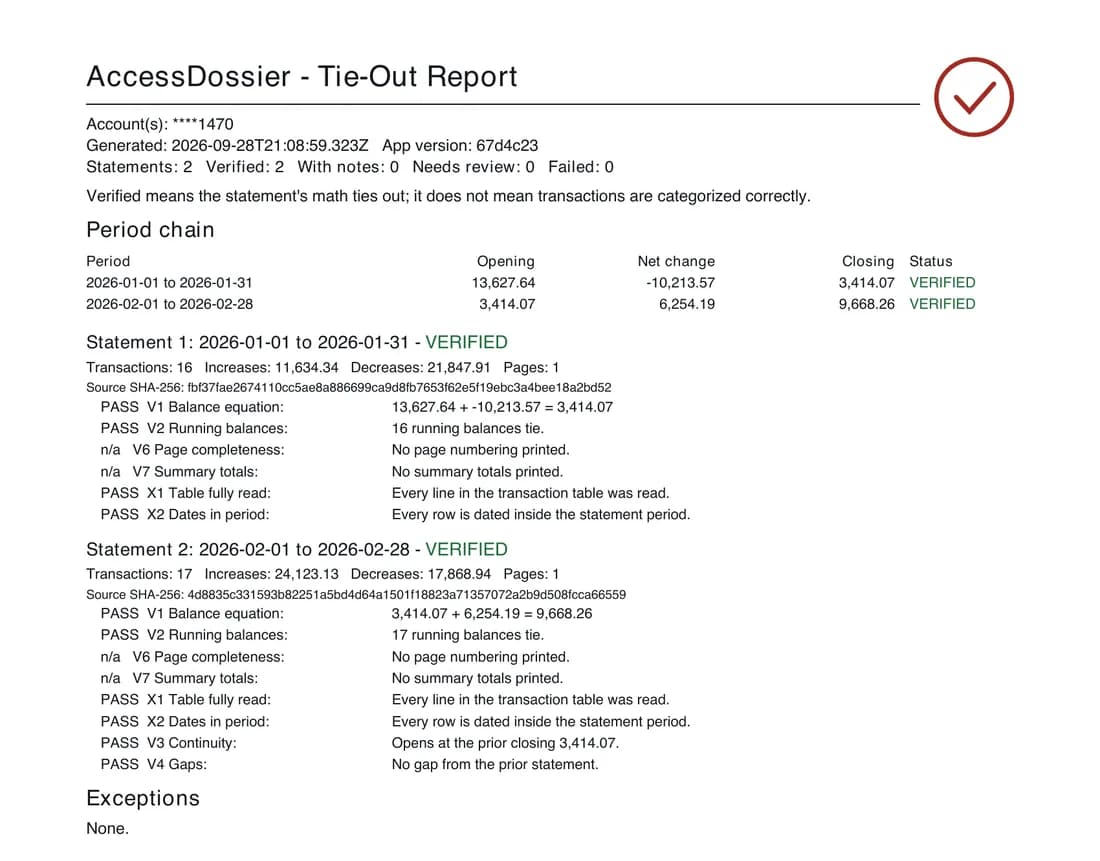
A report you can file with the workpapers
Every check, the arithmetic behind it, and a fingerprint of each source PDF. When someone asks how you know the books tie out, you hand them this.
Your clients’ statements are handled like client statements
- 7 days
- Source PDFs are deleted automatically within 7 days of upload.
- 30 days
- Results and reports are deleted 30 days after upload, or the moment you press Delete everything.
- No person
- No person at AccessDossier opens your files. The optional accuracy audit is a second machine read.
- No logins
- We never ask for bank logins, and nothing is sent to your QuickBooks or Xero.
Software only: no bookkeeping service, no categorization, no tax advice. How your data is handled
Your first 50 pages are free
No card to start. After that, a monthly plan by pages. Cancel any time, and any first-month payment is refunded on request within 14 days.
Compare plans- Solo600 pages a month$39 /mo
- Practice2,000 pages a month$89 /mo
- Firm5,000 pages a month$179 /mo
Common questions, straight answers
Everything you would want to ask before trusting a tool with client files.
Which statements can it read?
What happens when something doesn’t tie out?
Does it categorize transactions or post to QuickBooks or Xero?
Is AI reading my clients’ statements?
What does it cost after the free pages?
Can I cancel or get my money back?
Can I talk to someone?
Try it on the set sitting in your inbox.
Check a statement set free